Device Nominations
| |
Nomination Routine |
Description of Device |
| A |
gColourEps() |
Colour EPS file |
| B |
gLn03r() |
DEC LN03R Postscript Laser Printer |
| C |
gLaserw() |
Apple/Sun Laser Writer |
| D |
gLps40() |
DEC Print Server 40 |
| E |
gD12150() |
DEC Laser 2150 |
| F |
gEps(cflag, xoff, yoff, xsize, ysize, xdef, ydef) |
Generic Routine (for printers) |
| G |
gEpsexp(xsize, ysize, xmarg, ymarg, n, prop) |
Generic Routine (for import filters) |
Device Characteristics
| Max X Dimension (mm) |
420.0 |
284.5 |
284.5 |
431.8 |
290.5 |
User Defined |
User Defined |
| Max Y Dimension (mm) |
297.0 |
197.3 |
201.0 |
297.0 |
198.0 |
User Defined |
User Defined |
| Default X Dimension (mm) |
297.0 |
284.5 |
284.5 |
293.0 |
290.5 |
User Defined |
User Defined |
| Default Y Dimension (mm) |
210.0 |
197.3 |
197.0 |
206.0 |
198.0 |
User Defined |
User Defined |
| Colours / Greyscales |
255 (colour) |
255 (greyscale) |
255 (greyscale) |
255 (greyscale) |
255 (greyscale) |
User Defined |
User Defined |
| Colour Palette |
Static (default) or Direct |
Static (default) or Direct |
Static (default) or Direct |
Static (default) or Direct |
Static (default) or Direct |
User Defined |
User Defined |
| Thick Lines |
Yes (Default=0.0) |
| Character Sizes |
Any + 16 Pseudo-hardware in multiples of 1.5mm square |
| Polygonal Filling |
Solid only and maximum of 1500 Points |
| Image Handling |
Yes (Output only) |
| Window/Device Titling |
Yes |
Driver Availability
The POSTSCRIPT series of drivers are used for output to any Postscript compatible printer and are available on all systems. Under Windows, the standard Windows Postscript driver can also be accessed via the Print dialog by using one of the printer routines in the gMwin driver; gMwinp, gMwindp, gMwinpp (see gMwinp) or in the gWogl driver; gWoglp, gWogldp, gWoglpp (see gWoglp).
Driver Usage
The PostScript code produced by this driver conforms to the EPSF (Encapsulated PostScript File) format specified by Adobe Systems Inc., enabling GINO output to be exported to other applications such as desktop publishing systems (DTP) or directed to PostScript compatible printers. This driver provides two generic nomination routine gColourEps() and gEps() for printers, one generic nomination routine gEpsexp() for import filters plus a number of specific nomination routines, mostly, for older printers.
The default orientation when using any of the specific nomination routines is for the picture to be drawn in landscape mode, i.e. with the X dimension being greater than the Y dimension. The orientation for the generic nomination routines depends on the dimensions provided. In both cases the orientation can be changed by switching the X and Y paper size (either in the nomination routine or by calling gSetDrawingLimits()).
In the case of the generic PostScript export nomination routine, the application can control various properties of the PostScript file through the arguments, so that they are suitable for the import filter being used. Users are referred to the chapter on 'Importing and Exporting' to enquire the requirements and options of the most popular import filters that accept PostScript files.
Device Nomination
The following generic printer routine is available with this driver:
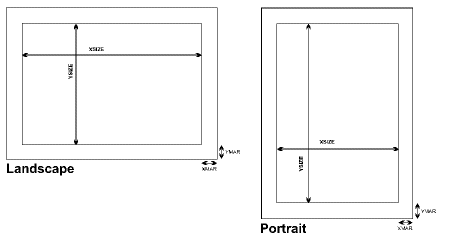
gEps(cflag,xoff,yoff,xsize,ysize,xdef,ydef)
The parameters have the following values:
cflag
|
Int |
Colour flag (+'ve = Colour, -'ve = Greyscales, 0 = Monochrome). See Colour Setting section below. |
xoff,yoff
|
Float |
Shortest distance in millimetres of drawable area from the PostScript origin. |
xsize,ysize
|
Float |
Maximum size of drawing area in millimetres. |
xdef,ydef
|
Float |
Default size of drawing area in millimetres. |
The above diagram shows the definition of xsize and ysize which is the same for xdef and ydef. Note that the xoff and yoff distances are reversed depending on the orientation of the GINO picture. It must also be realised that the PostScript origin may not be the same as the paper origin on some devices.
A second generic routine is available aimed at exporting PostScript files from GINO to be read by WP, DTP import filters and PostScript viewers:
gEpsexp(xsize, ysize, xmarg, ymarg, n, prop)
The parameters have the following meanings:
xsize,ysize
|
Float |
Print area in millimetres. |
xmarg,ymarg
|
Float |
Horizontal and vertical margins (added to Bounding Box limits). |
n
|
Int |
Number of elements in prop array (rounded down to the nearest even number) |
prop
|
Int [] |
EPS properties array containing PAIRS of property flags and their settings according to the table below. |
| Property |
Property Description |
Settings |
| 1 |
Initial Colour Mode (NDT) |
= -2, Indexed Greyscale
= 1, Monochrome
= 2, Index Colour (Default)
= 4, True Colour |
| 2 |
Rotation Flag |
= -1, Auto rotation (0o or 270o)
= 0, No rotation (Default)
= 1, 90o rotation
= 2, 180o rotation
= 3, 270o rotation |
| 3 |
Bounding Box Flag |
= 0, Print area at start of file
= 1, Drawing area at end of file (Default)
= 2, Drawing area at start of file |
| 4 |
TIFF header |
= 0, No TIFF header (Default) |
The PostScript file generated through the gEpsexp() nomination routine will represent an area defined by xsize,ysize and contain optional margins as specified by the argument xmarg, ymarg. Additional properties, if different from the defaults, may be specified by passing a property and its setting, in pairs, through the prop array. Thus if an import filter required a monochrome PostScript file with the actual drawing limits at the start of the file, the values 1,0,3,2 would be passed in prop with n set to 4.
The auto-rotation setting is the same as the default operation of the gEps() nomination routine whereby a landscape print area (xsize > ysize) will cause a rotation of 270 of the plot.
The default settings for the colour eps (gColourEps()) nomination routine are 2,0,2,0 and the default settings for the monochrome printer nominations routines are -2,-1,1,0.
Bounding Box
The bounding box flag determines the position and source of the values placed in the %%BoundingBox command within the PostScript file. The default option (1) places the %%BoundingBox (atend) command at the start of the file and places the actual drawing limits in a command at the end of the file. Many PostScript interpreters, however, require the %%Bounding Box command at the start of the file and for this, two options are available. Option 0 places the print/paper area as defined by the arguments in gEpsexp (or that subsequently re-defined in a call to gSetDrawingLimits) at the start of the file. Option 2 places the actual limits of the drawing at the start of the file by postprocessing it once these limits are known. The difference between the print/paper area and the actual drawing limits is that the latter only includes the rectangular area where drawing actually occurs ignoring any blank space round the edges and therefore can be more accurate.
Paper Size and Paper Tray
The paper size can only be enlarged on model LPS40 or when using gEps() where the maximum drawing area is larger than the default. Any size greater than the default drawing size assumes that A3 paper is loaded in the printer. All other models have the default paper size the same as the maximum paper size. Where alternative paper trays are available, these may be selected using the type argument to gSetDrawingLimits(). Values of 1,2 or 3 will select paper trays 0,1 and 2 using the PostScript 'setpapertray' command. If type = 0 no paper tray selection is made.
Colours/Greyscales
PostScript devices can be defined as colour, monochrome or greyscale through the nomination routines gEps() and gEpsexp(), the colour eps (gColourEps()) default is colour and all other nominations are defined as greyscale. On colour and greyscale devices the number of colours/greyscales available is 255 and on monochrome devices it is 0 (erase) and 1. If the device has been setup as a monochrome device, gDefineRGB() will have no effect.
On greyscale devices colours 0-9 default to the following shades of grey with 0=white and 1=black.
Colour and greyscales are used for all output primitives except for single dot width lines on greyscale devices as this results in a dashed line effect.
Character Fonts
The following registered hardware fonts can be selected using gSetCharFont(font) or gSetCharFontName(fontname):
| font |
fontname |
font |
fontname |
| 100 |
Courier (default) |
106 |
Souvenir |
| 101 |
Helvetica |
107 |
Palatino |
| 104 |
Lublin Graph |
170 |
Symbol |
| 105 |
New Century |
171 |
Dingbats |
Any value of font outside of this range or if the font selected is not available, will select the Courier font. The Courier font is a fixed-pitch font, the remainder are variable-pitch.
Bold versions of fonts 100-107 can be selected by using the routine gSetFontWeight(weight) where the standard font is selected if weight is less than or equal to zero and the bold version is selected if weight is greater than zero.
Outline versions of the fonts can be selected using the routine gSetFontFillStyle(style) where style.type is set to GOUTLINE. All other values of style.type select the solid filled font.
File Format & Job Title
The following configuration settings can be made to alter the default file format and to add job titles to pages:
|
POSTFORMAT=YES |
Sets the default output file format to be formatted and therefore suitable for inclusion into DTP systems. This setting is overridden by application programs that use the routine gSetDeviceFilename(). |
|
POSTHEAD=ALL |
Automatically outputs job creator and date to top left of every page |
|
POSTHEAD=n |
Automatically outputs job creator and date to page n |